Bluefurt Instagram Templates: A Designer’s Practical Review
Every brand manager or content creator hits that wall eventually. You need a feed that looks cohesive, professional, and engaging, but the time investment to design from scratch is simply not there. This is where pre-designed assets stop being a shortcut and start being a strategic necessity. The Bluefurt Instagram Templates are not just another set of static layouts; they are a specific toolkit built for efficiency and visual impact.
Understanding the Asset Composition
When you download this package, you are getting more than just a picture. The core of the Bluefurt Instagram Templates lies in the 1.13 PSD file. This file is engineered for customization, not just static editing. It utilizes Smart Objects, which is the industry standard for non-destructive editing. This means you can swap out imagery without ruining the resolution or the effects applied to the layer.
There is a specific workflow to this that designers appreciate for its speed. The process is streamlined: you double-click on the image layer, click the layer icon twice within the group, and place your own image. A quick CTRL+S saves the changes, and the template automatically applies the necessary styling to your photo. It removes the tedious masking and warping process that eats up billable hours.
Technical specifications matter for print and digital consistency. These templates are set to 300 DPI and use the RGB color mode. This is crucial because while RGB is standard for screens, the high DPI ensures that if you ever need to pull a specific graphic for a print lookbook or a physical banner, the quality holds up. The file sizes are optimized for the platform, offering dimensions of 1200 x 1200 px for the classic square grid and 1920 x 1080 px for landscape or story variations.
Visual Personality and Brand Application
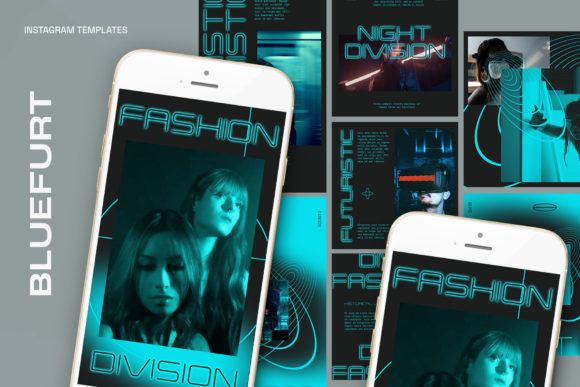
The aesthetic of the Bluefurt Instagram Templates leans toward a clean, modern typography style. It avoids the chaotic layering often found in over-designed assets. Instead, it focuses on visual hierarchy. The layout guides the viewer’s eye from the headline to the image, and finally to the call to action. This is essential for social media graphics where you have roughly three seconds to capture attention before a user scrolls past.
For entrepreneurs and small business owners, this style acts as a blank canvas that elevates your content rather than overshadowing it. If you are a publisher or blogger, the clean lines ensure that your text remains readable, even on mobile devices with smaller screens. The personality is professional yet approachable—exactly what you need for brand identity work that targets adults aged 20 to 50.
Because the text is fully editable with the text tool, you are not locked into the creator’s messaging. You can adapt the tone instantly. Need a bold, punchy headline for a flash sale? Change the font weight. Need a softer, more elegant script for a wedding announcement? Swap the typeface. The structure remains solid, but the voice is entirely yours.
Strategic Usage in Creative Projects
The versatility of the Bluefurt Instagram Templates extends beyond simple posts. Consider how these assets fit into a broader marketing strategy. You can use the square format for your main feed to maintain a strict grid aesthetic, while utilizing the wider format for promotional videos or interview snippets.
Here are a few practical applications for different audiences:
- For Crafters and Hobbyists: Use the Smart Object feature to showcase high-resolution close-ups of your work. The 1200x1200 resolution allows for crisp details of textures like wood, yarn, or paint.
- For Marketers: Treat these templates as a design asset library. Create a series of "Tip of the Day" posts using the same layout but different text. This builds recognition and consistency.
- For Brand Strategists: Use the templates to mock up a social media campaign before committing to a full build-out. It helps visualize the flow of a campaign.
Technical Execution and Workflow Tips
The claim of being "easy to use" is subjective, but the mechanics here support it. The key is understanding the layer structure. When you open the PSD, you will see that the image layers are grouped. The instruction to click the layer icon twice is a specific Adobe Photoshop command that ensures you are editing the contents of the Smart Object, not just the mask.
One common mistake with premium fonts and templates is color management. Since the file is in RGB, it is ready for web. However, if you are integrating these graphics into a video edit, ensure your timeline matches the color profile to avoid washed-out blacks.
Remember that the model is not included. This is standard for commercial fonts and templates, but it places the responsibility on you to source high-quality stock photography. A template is only as good as the content you put inside it. A low-resolution image inside a high-resolution Smart Object will still look pixelated.
Evaluating Fit and Font Pairings
When incorporating the Bluefurt Instagram Templates into your brand identity, consider how they interact with your existing font pairing strategy. If your brand uses a heavy serif font for headers, these templates might serve better for body copy or secondary information, perhaps utilizing a sans serif font style for contrast.
Conversely, if your brand is built on modern typography and minimalism, these templates will slide right in. They work exceptionally well for editorial design styles—think magazine layouts translated to Instagram. The clean structure supports web design principles like the "F-Pattern" reading layout, making the content intuitive for the viewer.
Ultimately, the value of the Bluefurt Instagram Templates lies in their ability to act as a force multiplier for your creative output. They handle the heavy lifting of composition and alignment, freeing you up to focus on the message and the strategy. Whether you are running a global brand or a local hobby shop, having a reliable, editable, and high-quality template library is the difference between a consistent presence and a sporadic one.