Streamline Your Pitch with Business Presentation Slide Templates
Every professional, from a startup founder to a corporate manager, eventually faces the same challenge: conveying complex ideas clearly and compellingly. Business Presentation Slide Templates serve as the structural foundation for these critical communications. They are pre-designed frameworks that allow you to plug in your content—text, images, data, and logos—without starting from a blank canvas. This approach is not about being lazy; it is about being efficient and ensuring a polished, professional result that respects your audience's time and intelligence.
Why a Professional Template Matters More Than You Think
The visual quality of your presentation directly influences your credibility. A cluttered, poorly designed slide deck can distract from your message, while a clean, well-organized template reinforces your key points. For entrepreneurs and small business owners, this is especially vital. A pitch deck or quarterly report presented using a professional template can make the difference between securing investment and losing a stakeholder's attention. It signals preparation, attention to detail, and respect for the business relationship.
Different professionals, however, prioritize different aspects of a template. A marketing manager might value templates with ample space for bold imagery and brand colors. A financial analyst, on the other hand, may need layouts optimized for data visualization, charts, and minimal text. Educators and trainers often look for templates that support step-by-step explanations and interactive elements. Understanding your primary use case is the first step in selecting the right template library.
The Anatomy of a High-Quality Template
Not all templates are created equal. A truly useful business presentation template should be built with flexibility and quality in mind. Key features to look for include:
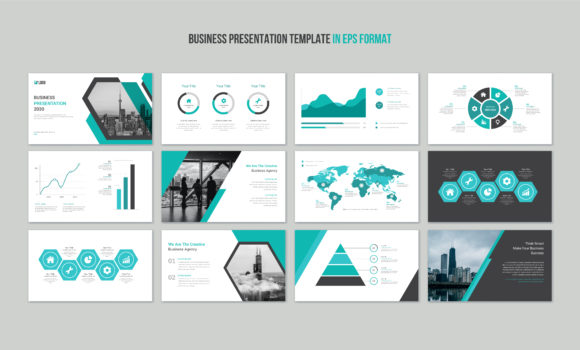
- High-Resolution and Vector Graphics: Templates created as vector files (like EPS or SVG) ensure your slides look crisp on any screen, from a laptop to a large conference room display. This is non-negotiable for professional settings.
- Fully Editable Elements: Every component—text boxes, shapes, icons, and color fills—should be easily customizable. This allows you to align the template perfectly with your brand identity without struggling with locked layers.
- Organized Layer Structure: A well-organized file, often built in design software like Adobe Illustrator, saves immense time. You can quickly locate and edit specific elements, which is crucial when you're under a deadline.
- Commercial Use License: For creators and freelancers, confirming that the template comes with a license for commercial projects is essential. This protects you legally when using the design for client work.
A template set that includes multiple file formats (such as EPS, SVG, and JPG) offers versatility. The EPS and SVG files are for editing, while the JPGs can be useful for quick previews or digital handouts.
Matching the Template to Your Goals
Your skill level and project goals should guide your choice. Beginners and those less comfortable with design software should seek out templates that are intuitive and come with clear instructions. The promise of "easily editable text, logo, color, and image" is a key feature here, as it lowers the barrier to creating something that looks professional.
Experienced designers and agencies, meanwhile, might use high-quality templates as a starting point to accelerate their workflow. Instead of building every slide from scratch, they can adapt a superior template structure, focusing their creative energy on unique content and storytelling. This blend of efficiency and customization is a powerful strategy for scaling client work.
For corporate training and education, the template's clarity is paramount. Slides need to support learning objectives without visual noise. A template with a consistent, clean layout helps students or trainees focus on the material being presented, whether it's a new software protocol or a leadership workshop.
Practical Considerations for Your Workflow
Beyond aesthetics, consider the practical workflow implications. A template that uses popular, free fonts prevents last-minute font licensing issues. The note that "images are not included" is a standard and important disclaimer. It reminds you that you will need to source your own high-quality photography or illustrations to complete the presentation. This is actually an advantage, as it ensures your visuals are unique and relevant to your specific content, rather than using generic stock images.
When evaluating a template, ask yourself a few questions:
- Does the layout variety suit my content? Look for a mix of title slides, content slides, data visualization slides, and closing slides.
- How much time will this save me? A good template should cut your design time in half, allowing you to focus on refining your message.
- Is the support accessible? Knowing you can contact the creator for help with customization or file issues provides valuable peace of mind.
Making the Final Decision
Ultimately, the right business presentation slide template is one that feels invisible. It should enhance your message, not overshadow it. For a creative corporate business, a template with modern, dynamic layouts can help convey innovation. For a legal or financial firm, a more traditional, structured template might project stability and trust.
Think of the template as a professional tool, much like a quality notebook or a reliable software program. It provides the structure, you provide the expertise. By choosing a template that aligns with your technical comfort, brand standards, and communication goals, you transform the daunting task of presentation design into a streamlined, effective process. The result is a polished, persuasive slide deck that lets your ideas shine.