Network Security 3D - PPT Templates: Professional Creative Design
Why Visual Storytelling Matters in Cybersecurity
In the digital age, trust is the new currency. For startups, agencies, and established enterprises alike, communicating a robust security posture is no longer just an IT concern—it is a fundamental business requirement. However, the concepts behind network security can often feel abstract, technical, and dry to a lay audience. This is where the power of design intersects with strategy. The Network Security 3D - PPT Templates offer a solution that bridges the gap between complex technical realities and clear, engaging visual communication.
This is not just another set of slides; it is a professional creative PowerPoint design specifically curated to transform how you present data protection, privacy, and infrastructure integrity. Whether you are pitching a new SaaS product, updating stakeholders on compliance, or educating a team on best practices, the visual language you use dictates how your message is received. By utilizing 3D elements and a modern aesthetic, this template elevates the subject matter from mundane to memorable.
Anatomy of a High-Impact Presentation
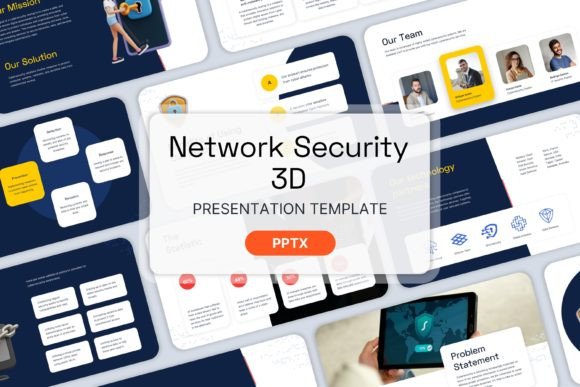
What makes a presentation tool truly effective is its flexibility paired with structure. The Network Security 3D - PPT Templates were built with a deep understanding of business workflows. The package contains 20 meticulously designed slides, ensuring you have enough variety to cover an entire pitch or workshop without running out of visual ideas.
Key Features for Seamless Workflow
- 20 Slides Powerpoint Template: A comprehensive deck that covers everything from the title slide to data charts and closing calls to action.
- Master Slides Inside: This is a critical feature for efficiency. By using master slides, you can ensure global changes to fonts, logos, or color palettes are applied instantly across the entire deck.
- Fully Organized Structure: Time is money. The logical flow of the slides helps you structure your narrative naturally, guiding the audience from problem identification to solution implementation.
- Image Placeholder: The design is built to accommodate your specific branding. You can easily drag and drop your own screenshots, team photos, or product mockups into the pre-defined spaces.
A notable aspect of this specific download is that the Zip File contains no images. While this might sound counterintuitive, it is actually a massive advantage for professionals. It keeps the file size lightweight, ensures there are no licensing issues with stock photography, and forces you to insert your own authentic content immediately. This ensures your presentation is unique to your brand, not a generic copy-paste job.
Creative Applications Across Industries
While the name suggests a focus on Network Security, the versatility of a high-quality 3D template extends far beyond just antivirus software presentations. The abstract nature of 3D shapes—spheres representing nodes, blocks representing data, and shields representing protection—allows for creative interpretations across various sectors.
For Startups and Entrepreneurs
If you are a startup founder in the Fintech or Healthtech space, security is your selling point. Investors and early adopters need to know that user data is safe. Use this template to create a "Trust Architecture" slide. Instead of listing bullet points, use the 3D visual metaphors to show how data flows securely from the user to your server and back. The Color Scheme provided is designed to be professional yet modern, helping you look like an established entity even in the early stages.
For Educators and Corporate Trainers
Teaching cybersecurity concepts to non-technical staff can be challenging. Abstract 3D graphics help simplify complex ideas like "The Cloud," "Firewalls," or "Encryption." An educator can utilize the Image Placeholder feature to insert diagrams of network topologies, overlaying them with the 3D design elements to create a layered, easy-to-understand educational module.
For Marketing and Agency Professionals
Agencies pitching security solutions to clients need to demonstrate creativity and competence simultaneously. A generic stock slide deck signals low effort. By using this professional creative PowerPoint design, you signal that you value aesthetics and organization. You can adapt the slides to pitch a cybersecurity audit service, a new privacy policy rollout, or a digital transformation strategy that prioritizes safety.
Practical Guide to Customization
To get the most out of the Network Security 3D - PPT Templates, you need a strategy for customization. Because the file is clean and ready for your input, the focus should be on consistency and clarity.
- Define Your Palette: While the template comes with a standard color scheme, you should immediately adapt it to your brand guidelines. Change the accent colors to match your logo. This small step creates instant brand recognition.
- Curate Your Imagery: Since the zip file is image-free, prepare your assets beforehand. Look for high-resolution images that match the "tech" vibe. Avoid blurry screenshots. If you are showcasing software, use clean mockups. If you are using people, ensure they look professional and diverse.
- Simplify Your Text: The slides are designed with specific text blocks for a reason. Do not overcrowd them. Use the slides to highlight key data points, and keep the detailed explanations in your speaker notes or a separate handout.
- Leverage the 3D Elements: Do not delete the 3D shapes; use them as anchors for your content. For example, place a key statistic inside a 3D frame to give it depth and importance.
Keeping Results Clear and Audience-Friendly
The ultimate goal of any presentation is retention. Your audience needs to walk away understanding why your network security strategy matters. The visual hierarchy in this template is designed to assist with this. By using bold headers and clean layouts, you prevent cognitive overload.
When presenting to business partners or clients, remember that less is more. The "Fully Organized" nature of the deck allows you to tell a story: Problem -> Solution -> Implementation -> Result. Use the first few slides to set the stage with the risks of poor security (using dark, moody 3D imagery), and transition to brighter, cleaner slides as you introduce your solution.
Ultimately, the Network Security 3D - PPT Templates are a tool to help you communicate trust. By combining the professional creative PowerPoint design with your own unique content and data, you create a persuasive narrative that not only informs but also inspires confidence in your business or project.