Evaluating the Black Friday Planner Canva Templates 7: A Comprehensive Review for Organized Shopping and Selling
As the holiday season approaches, the pressure to manage sales, track gifts, and control budgets intensifies for both consumers and business owners. In the digital planning space, visual templates have become a popular tool for organizing chaotic events like Black Friday. Among the various resources available, the Black Friday Planner Canva Templates 7 offers a specific approach to managing this annual rush. This review explores the structure, utility, and fit of this template set to help you determine if it aligns with your organizational style and business needs.
Understanding the Structure and Scope
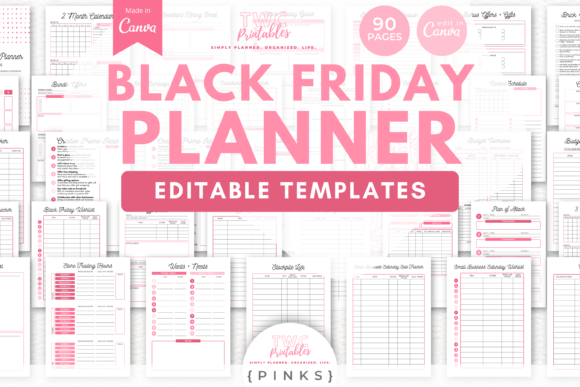
The Black Friday Planner Canva Templates 7 distinguishes itself through its sheer volume and dual-purpose design. Unlike generic to-do lists, this package includes 90 distinct templates designed for editing within Canva. The set is divided into two specific categories: a Sales Planner for personal shopping (comprising 30 sheets) and a Sales Planner for businesses (comprising 60 sheets). This division is a key feature, acknowledging that the needs of a consumer hunting for deals differ significantly from those of a retailer managing inventory and promotions.
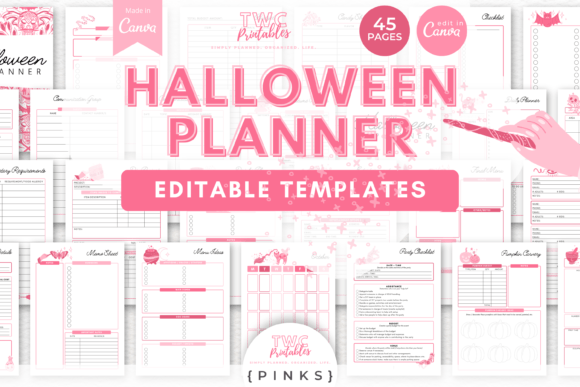
The templates are formatted for standard paper sizes, including A4 and US Letter, making them suitable for both digital use on tablets and traditional printing. The aesthetic leans toward a bright design with a specific "PINKS" color palette. However, a major advantage of the Canva-based system is the flexibility to modify every visual element. Users can change fonts, colors, shapes, and layouts to match their personal or corporate branding, ensuring the planner feels customized rather than generic.
Deep Dive: The Personal Shopping Suite
For the individual shopper, the Black Friday Planner Canva Templates 7 provides a structured method to prevent impulse buying and budget overruns. The personal shopping section includes dedicated sheets for a Budget Overview and Budget Breakdown. These tools are essential for users who need to visualize their financial limits before the sales begin.
Beyond finances, the template addresses the logistical challenges of the season. It includes a Plan of Attack sheet, which allows users to strategize their shopping day, and specific trackers for different events. Notably, the set differentiates between Black Friday, Cyber Monday, and Small Business Saturday. This granularity helps shoppers who intend to spread their spending across different days and platforms. Additionally, the inclusion of an Online Shopping Passwords sheet and a Stockpile List offers practical utility for managing the digital clutter and bulk-buying opportunities that often accompany these sales.
Deep Dive: The Business Sales Tracker
For entrepreneurs and small business owners, the business-focused portion of the Black Friday Planner Canva Templates 7 serves as a command center. With 60 sheets dedicated to business operations, the set moves beyond simple planning into active sales management.
The core of this section is the Sales Tracker. While many planners focus on planning, this template emphasizes the logging of actual results. It allows business owners to monitor daily sales, track inventory movement, and record transaction details. The inclusion of a Sales Goal sheet is particularly useful for setting benchmarks and measuring success against previous years or specific targets. For businesses that operate across multiple channels, the ability to track Online Shopping sales separately from physical inventory can provide valuable data for post-event analysis.
Comparison with Alternative Planning Methods
When evaluating the Black Friday Planner Canva Templates 7, it is helpful to compare it against other common organizational methods.
Digital Spreadsheets (Excel/Google Sheets): Traditional spreadsheets are powerful for data calculation and automation. If your primary goal is complex financial modeling or automated inventory syncing with your e-commerce platform, a spreadsheet is likely superior. However, the Canva templates offer a more visual and intuitive interface. For users who prefer a "binder-style" experience or need to print physical copies for their team or family, the Black Friday Planner Canva Templates 7 provides a cleaner, more aesthetically pleasing presentation.
Generic Printable Planners: There are many free or low-cost printable planners available online. However, these are often static PDFs. The Black Friday Planner Canva Templates 7 offers a significant advantage in customization. Because the source files are in Canva, you are not stuck with the creator's font or color choices. If your business branding is blue and gold, you can adapt the "PINKS" template to match in minutes. This level of control is rarely available in standard printables.
Specialized Project Management Software: Tools like Asana, Trello, or Notion are excellent for team collaboration and task automation. They are generally the better choice for large enterprises with complex workflows. The Black Friday Planner Canva Templates 7 is likely better suited for solopreneurs, small teams, or individuals who do not require the overhead of complex software. It acts as a lightweight, focused tool specifically for the holiday season without the learning curve of full-scale project management systems.
Tradeoffs and Limitations
While the Black Friday Planner Canva Templates 7 is robust, there are tradeoffs to consider.
- Manual Data Entry: Unlike a spreadsheet, the Canva templates require manual updates. You cannot automatically sum up your expenses or sales figures within the canvas itself; you must calculate and type the numbers. This can be time-consuming for high-volume businesses.
- Canva Dependency: To use these templates, you must have a Canva account. While a free account is sufficient, users who are unfamiliar with Canva's interface will face a learning curve when attempting to edit layouts or resize elements.
- Static Nature: While the design is editable, the functionality is static. If you need a tracker that integrates with your website or sends automated alerts when stock is low, this template will not meet that need.
Best-Fit Scenarios
Determining if the Black Friday Planner Canva Templates 7 is right for you depends on your specific situation.
This planner is likely a strong fit if:
- You are a visual thinker who benefits from color-coded, aesthetically pleasing layouts.
- You are a small business owner who wants a dedicated, printable "war room" document to keep on your desk or share with staff.
- You are a personal shopper who wants to organize lists, passwords, and budgets in one cohesive document rather than scattered notes.
- You value design flexibility and want to align the planner with your existing brand identity.
You may need a different solution if:
- You require real-time data syncing or automated calculations for large inventory batches.
- You prefer a purely mobile app-based solution that sends push notifications.
- You are looking for a comprehensive marketing strategy guide rather than a tracking template.
Conclusion on Utility
The Black Friday Planner Canva Templates 7 serves as a comprehensive organizational framework. By combining a Sales Planner for business with a Sales Tracker for personal use, it attempts to cover the full spectrum of holiday management. Its reliance on Canva makes it highly accessible and customizable, bridging the gap between a rigid spreadsheet and a static printable. For those looking to impose order on the shopping frenzy with a tool that can be tailored to their exact visual preferences, this template set offers a practical, if manual, solution.