Elevate Your Career Documents with Modern CV Templates
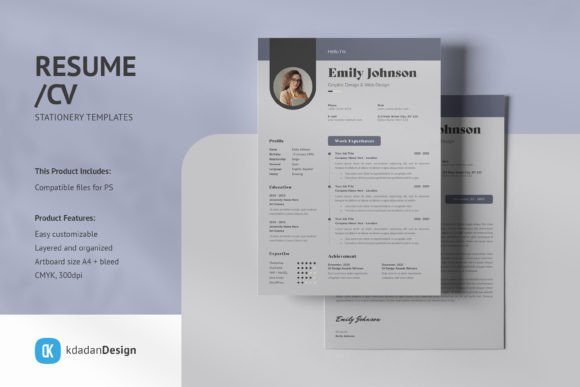
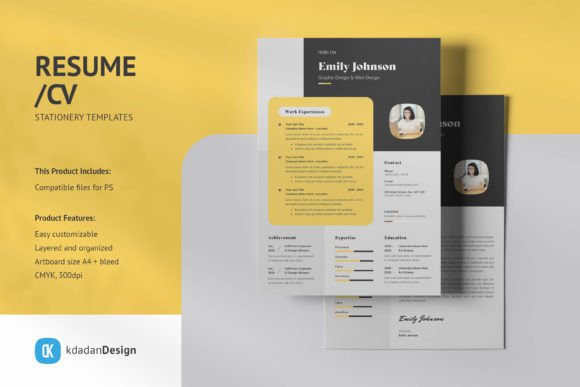
In a competitive job market, the document summarizing your professional history is often the first handshake with a potential employer or client. While content is king, presentation is the kingdom. A cluttered, text-heavy document can bury your best achievements. This is where high-quality design assets, specifically Resume CV PSD Design Templates Vol 19.2, come into play. This collection offers a suite of clean, modern, and professional layouts designed to transform standard career summaries into visually compelling portfolios.
At its core, this product is about bridging the gap between raw data and visual storytelling. It provides pre-structured Adobe Photoshop files that allow you to map your experience, education, and skills onto a canvas that looks intentional and polished. Unlike generic word processors, these templates utilize a grid system and typographic hierarchy that guides the recruiter’s eye exactly where it needs to go.
Understanding the Design Philosophy: Clean, Modern, and Professional
The terminology used to describe these templates—clean, modern, and professional—is not just marketing speak; it refers to specific design principles that impact readability. "Clean" implies the use of white space, ensuring the document does not feel cramped. "Modern" suggests the use of contemporary fonts and layout structures, moving away from outdated serif-heavy designs. "Professional" indicates a color palette and structure that respects corporate standards while still allowing for individuality.
For the graphic designer or creative professional, these PSD files serve as a robust foundation. You are likely already familiar with Adobe Photoshop, meaning the learning curve is virtually non-existent. You aren't just buying a template; you are buying a time-saving wireframe. Instead of setting up margins, guides, and baseline grids from scratch, you can focus immediately on tailoring the color scheme to your personal brand or adjusting the typography to match a specific agency's vibe.
Technical Specifications: Built for Print and Digital
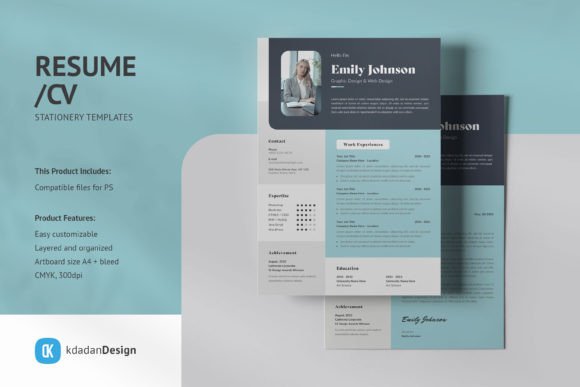
One of the most critical aspects of any printable design asset is its technical setup. Resume CV PSD Design Templates Vol 19.2 addresses this by adhering to industry standards: A4 size with bleed, CMYK color mode, and 300dpi resolution.
For the job seeker who is not a design expert, these specs might sound like jargon, but they are essential for reliability. CMYK and 300dpi ensure that when you print your resume at a local shop or a home office, the colors on the paper match what you see on the screen, and the text remains crisp rather than pixelated. The inclusion of "bleed" means you can have design elements that extend to the very edge of the paper without leaving awkward white borders after cutting. This attention to detail signals to a hiring manager that you understand professional standards.
Smart-Objects: A Workflow Revolution for Beginners and Experts
Perhaps the most practical feature for a wide range of users is the use of Smart-Objects. In Photoshop, a Smart Object is a container that preserves an image's source content with all its original characteristics, enabling non-destructive editing.
For the beginner or entrepreneur who may be intimidated by complex software, this feature is a game-changer. You do not need to manually resize, crop, or distort your headshot to fit a circular or square placeholder. You simply double-click the Smart-Object layer, paste your image, save, and the template automatically applies the correct perspective and masking. This "easy to use" functionality prevents the frustration of warped photos or mismatched layers.
For the experienced user, Smart-Objects allow for rapid iteration. If you are a freelancer applying to multiple gigs, you can swap out a professional headshot for a more creative portrait in seconds to match the tone of the client. The layers are separated logically—text, images, and graphics are distinct—which means you can toggle off a background graphic for a cleaner look or change a sidebar color without breaking the rest of the layout.
Customization: Flexibility for Diverse Needs
A one-size-fits-all resume rarely works. A marketer needs to highlight campaign metrics, while an educator focuses on curriculum development and certifications. The customizable nature of these templates allows different professions to prioritize different information.
- The Creative Hobbyist or Creator: You might use these templates to create a "Media Kit" rather than a traditional resume. By utilizing the image containers and replacing text blocks with portfolio links or statistics, you can repurpose the "Resume CV PSD Design Templates Vol 19.2" to pitch to brands for collaborations.
- The Corporate Professional: You may prefer a minimalist layout. The ability to replace colors allows you to strip away vibrant hues in favor of navy, charcoal, or slate, maintaining the conservative look required in fields like law or finance while still benefiting from the modern grid layout.
- The Small Business Owner: If you are hiring, understanding these templates helps you evaluate the design literacy of incoming applicants. Alternatively, you can use the templates to standardize the look of your internal team profiles on your website.
Evaluating the Investment: Cost vs. Time
When considering this product, it is helpful to look at the trade-off between cost and time. For a student or recent graduate, budget is often a primary concern. While the template has a price, the "free fonts" aspect (via download link) helps mitigate additional design costs.
However, the real value lies in speed. Formatting a resume in a standard word processor to look "high-end" can take hours of fighting with text boxes and alignment tools. With Resume CV PSD Design Templates Vol 19.2, the structure is already built. You are essentially paying for the hours of design work you don't have to do. For a freelancer whose time is billable, spending a small amount on a template to get back to client work faster is a sound financial decision.
Important Considerations for Your Workflow
While the product is comprehensive, it is important to manage expectations regarding software requirements. This is a PSD (Photoshop) file. If you do not have access to Adobe Photoshop or a compatible alternative that can edit PSD layers, this specific product will not be functional for you. It is designed for users who are comfortable with raster-based editing software.
Additionally, it is worth noting what is not included. The product features note that model images are for presentation only. This means you must have your own professional headshot ready. For the job seeker, this is a reminder to invest in a good photo; a beautiful template cannot salvage a low-resolution or poorly lit selfie. The mockups used in the product display are also not included, so you should focus on the actual file layout rather than the surrounding 3D presentation.
Who Benefits Most from This Template?
Ultimately, Resume CV PSD Design Templates Vol 19.2 is best suited for individuals who value a polished visual identity and possess basic proficiency in Photoshop. It is an inclusive tool that adapts to the user's intent.
If you are a designer, it saves you production time. If you are a non-designer with software access, it elevates your application above the standard Word document defaults. By separating text and graphics into distinct layers, the template empowers you to tell your unique career story through a medium that is both aesthetically pleasing and technically sound. Whether you are applying for a corporate leadership role, pitching a freelance gig, or updating your professional portfolio, having a reliable, customizable template ensures your first impression is a strong one.